
NoteBurner Apple Music Converter Review and Best Alternative

If you’ve been searching for a way to save songs from Apple Music as MP3 files, chances are you’ve come across the NoteBurner Apple Music Converter. It’s one of the tools people often recommend for downloading and converting Apple Music tracks so they can be played offline on different devices.
But before you download it, you probably have a few questions. Is NoteBurner actually safe? Does it really work the way it claims? And more importantly, is it worth the price, or are there better alternatives out there? That’s exactly what this review will help you figure out.
What is NoteBurner Apple Music Converter?
NoteBurner Apple Music Converter is a tool designed to help you download and convert music from Apple Music, audiobooks, podcasts, and M4P tracks into widely supported formats like MP3, AAC, WAV, FLAC, AIFF, and ALAC. Whether you want offline access to your favorite tracks or need to play them on devices that don’t support Apple Music, NoteBurner makes the process simple and fast. It works with both the Music app and the Apple Music web player, and it even allows editing ID3 tags, converting AA/AAX audiobooks, and basic audio editing. The software claims up to 10× faster conversion speed while keeping high-resolution, lossless audio quality intact.

- Supports Apple Music, audiobooks, podcasts, and M4P tracks
- Converts to multiple formats, including MP3, AAC, FLAC, WAV, AIFF, ALAC
- Preserves original quality and ID3 tags
- Fast conversion speed (up to 10×)
- Works on macOS and Windows with multi-language support
- Only one license per computer
- DRM-protected streaming Apple Music cannot be converted
Price Plans:
- 1-Year License: $44.95 (≈ $3.74/month) – 1 computer, 1-year free updates, 5-day money-back guarantee
- Lifetime License: $89.90 – 1 computer, lifetime updates, 30-day money-back guarantee
How to Use NoteBurner Apple Music Converter?
Using NoteBurner Apple Music Converter to download songs from Apple Music is fairly straightforward. After installing the program on your computer, you can select the songs you want and convert them into MP3 or other formats for offline listening.
Step 1: Open NoteBurner Apple Music Converter on your computer. On Windows, double‑click the desktop icon. On Mac, open it from the Applications folder or launch it from the Dock.

Step 2: When the program opens, sign in with your Apple ID so the software can access your Apple Music library, albums, and playlists.

Step 3: Click the Add button at the top of the interface. This allows you to browse your Apple Music library and choose the songs, albums, or playlists you want to convert.

Step 4: After confirming your settings, click the Convert button. The software will begin converting the selected tracks, and you can watch the progress in the conversion list.

Step 5: Once the conversion is finished, click History in the top‑right corner to find your converted files. You can now play them on devices like smartphones, MP3 players, car audio systems, or DJ software.

Is NoteBurner Safe and Free?
If you’re reading this, you’re probably thinking about using the NoteBurner Apple Music Converter to download songs from Apple Music. And two questions usually come up first. Is it safe to install? And do you have to pay for it? Let’s clear that up.
Is NoteBurner Safe?
Yes, in general it’s safe to use if you download it from the official website. The program is widely used by people who want to convert Apple Music tracks into formats like MP3 so they can play them offline or on other devices. The software itself installs like a normal desktop program and doesn’t contain malware when downloaded from the official source. It simply accesses your Apple Music library and converts the tracks you choose. That said, it’s still smart to follow basic safety habits. Always download from the official site, avoid third‑party download pages, and keep your antivirus on. That’s the safest way to install any software.
Is NoteBurner Free?
Here’s the honest answer. It’s not completely free. NoteBurner offers a free trial, but it comes with limits. You can test the software and convert music, but only a short part of each track is processed during the trial. To unlock the full features like converting entire songs, downloading playlists in batches, and exporting high‑quality audio files, you’ll need the paid version. So if you just want to test how it works, the free trial is enough. But if your goal is to download full songs or playlists from Apple Music, you’ll eventually need a license.
Best NoteBurner Apple Music Converter Alternative
If you tried NoteBurner Apple Music Converter but want something more flexible, a strong alternative is AudiConv Apple Music Converter. AudiConv works with Apple Music, Spotify, Amazon Music, YouTube Music, Deezer, SoundCloud, and more. Instead of saving songs as temporary cache files like the Apple Music app does, AudiConv converts them into normal audio formats such as MP3, AAC, WAV, FLAC, AIFF, and ALAC so you can keep them on your computer and transfer them to any device. Another useful feature is batch downloading. You can paste a playlist link and download multiple songs at once at up to 10× faster speed, while keeping the original audio quality and ID3 tags like title, album, artist, and artwork.
AudiConv – All-in-1 Music Converter
- Download music from 10,000+ streaming platforms including Apple Music
- Convert Apple Music to MP3, AAC, WAV, FLAC, AIFF, or ALAC
- Support high‑quality output up to 320kbps MP3
- Batch download entire albums or playlists at once
- Preserve ID3 tags like title, album, artist, genre, and artwork

▼ How to Download Apple Music to MP3 320kbps?
Downloading Apple Music songs with the AudiConv Apple Music Converter is simple. Just copy the Apple Music track or playlist link and let the software convert it for you.
Step 1 Open AudiConv on your computer and switch to the Online section. Then access Apple Music through the builtin web player.

Step 2 Sign in to your Apple Music account and find the song, album, or playlist you want to download.

Step 3 Open the music page and copy the track or playlist URL from Apple Music.
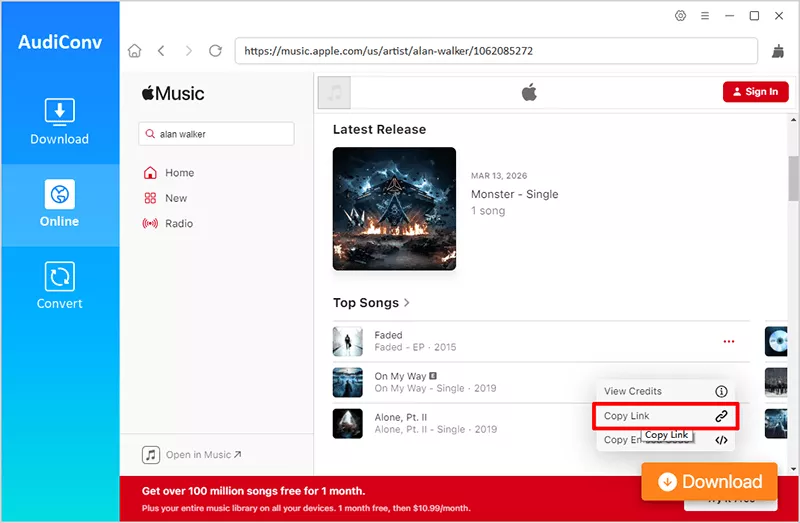
Step 4 Go back to AudiConv and click Paste URL in the Download section. The program will analyze the link and load all tracks automatically.

Step 5 Click Download and wait for the conversion to finish. Your songs will be saved on your computer as MP3 320kbps files, ready for offline listening on any device.

With this method, you can download entire Apple Music playlists in just a few minutes and keep them as permanent MP3 files on your computer.
NoteBurner vs. AudiConv, Which One is the Better?
If you’re trying to decide between NoteBurner Apple Music Converter and AudiConv Apple Music Converter, the real question is simple: which one helps you download and keep your Apple Music songs more easily? Both tools are designed to convert songs from Apple Music into common formats like MP3 so you can listen offline on any device. They also support batch downloading and keep important metadata like artist names and album artwork. However, there are some differences in supported services, trial limits, and overall flexibility.
| Feature | AudiConv Apple Music Converter | NoteBurner Apple Music Converter |
| Support Sites | 10,000+ platforms including Apple Music, Spotify, Amazon Music, YouTube Music, Deezer, SoundCloud | Mainly Apple Music, iTunes audio, audiobooks |
| Output Formats | MP3, M4A, WAV, FLAC, AAC, etc. | MP3, AAC, WAV, FLAC, AIFF, ALAC |
| Output Quality | Up to 320kbps | Up to 320kbps |
| Playlist & Album | ✅ | ✅ |
| Keep ID3 Tags | ✅ | ✅ |
| Price | Starts from $9.95 | Starts from $44.95 |
| Best For | Users who want an all‑in‑one downloader for multiple streaming services | Users who mainly want to convert Apple Music tracks |
Conclusion
If you’re looking into the NoteBurner Apple Music Converter, it’s probably because you want more control over your Apple Music library. Maybe you want to keep songs offline forever, play them on different devices, or convert them into MP3 files you can store anywhere. NoteBurner can definitely help with that. It converts Apple Music tracks into common formats and keeps useful details like artist names and album artwork. For many users, it’s a simple way to turn streaming songs into playable files. However, tools like AudiConv Apple Music Converter offer a bit more flexibility, especially if you use several music platforms and want to download playlists in batches. In the end, the right choice depends on what you need. If your goal is a simple Apple Music conversion, NoteBurner works. If you want broader support and faster batch downloads, an alternative like AudiConv Apple Music Converter is the better fit.
