
10 Best Paid & Free Apple Music Converters in 2026

If you use Apple Music, you’ve probably run into the same problem many others face. The songs you download inside the app can only be played there. You can’t easily move them to another device, save them as MP3 files, or play them on a regular music player. That’s frustrating, especially if you want more control over your music.
That’s why many people look for ways to convert Apple Music to MP3. Once a song is saved as an MP3 file, you can keep it on your computer, transfer it to your phone, or play it anywhere without needing the Apple Music app. In this article, we will share the 7 best Apple Music to MP3 converters to help you download favorite Apple Music songs in MP3 format with ease.
Best Apple Music Converter Recommended
If you want a simple and reliable way to convert songs from Apple Music to MP3, a dedicated converter is usually the easiest option. One tool many users prefer is AudiConv Apple Music Converter, which supports 10,000+ music streaming sites and allows you to download track, playlist, album, etc. From various sites directly. Morever, it also supports bulk download and keeps important details like artist name and album artwork, it makes managing downloaded music much easier. Once your Apple Music tracks are converted, you can play them on any device, transfer them to your phone, store them on a USB drive, or keep them permanently without needing the Apple Music app.
AudiConv – All-in-1 Music Converter
- Supports Apple Music, Spotify, Amazon Music, YouTube Music, etc.
- Convert Apple Music to MP3, AAC, WAV, FLAC, and more.
- Lossless audio quality that keeps the original sound after conversion.
- Up to 10× faster batch conversion for downloading playlists quickly.
- Preserves ID3 tags such as title, artist, album, artwork, and genre.

▼ How to Download Apple Music to MP3 320kbps?
Step 1 Open AudiConv on your computer and switch to the Online section. Use the built-in browser to access Apple Music.

Step 2 Log in to your Apple Music account and find the song, album, or playlist you want to download.

Step 3 Open the music page and copy the track or playlist URL.
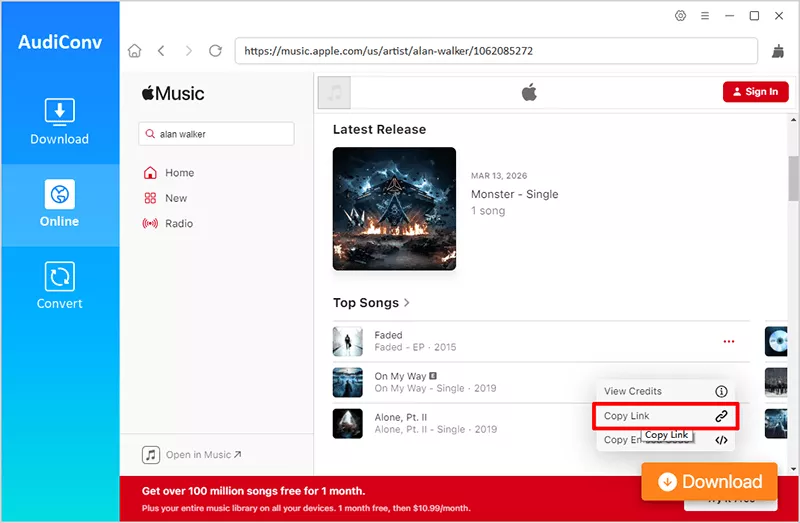
Step 4 Return to AudiConv interface and click Paste URL in the Download section. The software will analyze the link and load the tracks automatically.

Step 5 Click Download and wait for the conversion to complete. The songs will be saved to your computer as MP3 320kbps files for offline listening.

4 Best FREE Apple Music Downloaders Online
Online Apple Music downloaders are useful if you don’t want to install any software. Here are four free online tools that many users use to download songs from Apple Music.
Contents
1. APLMate
APLMate is one of the most popular web tools for downloading songs from Apple Music. It works entirely online, so you don’t need to install any software or extensions. The tool supports downloading single tracks, full albums, and even playlists by simply pasting the Apple Music URL. Another advantage is its compatibility. APLMate works on almost all browsers and devices, including Windows, Mac, Android, and iOS. It also offers MP3 downloads up to 320kbps, allowing you to save high-quality audio files for offline listening.
▼ How to Download Apple Music Online for Free?
Step 1: Copy the link of the Apple Music song, album, or playlist you want to download.
Step 2: Open the APLMate website and paste the copied link into the download box.
Step 3: Click the Download button and wait for the tool to process the link.

Step 4: Select the MP3 file and save it to your device.

- Completely free to use
- No software installation required
- Works on mobile and desktop browsers
- Supports MP3 downloads
- Limited batch download support
- Download speed depends on server traffic
2. AAPLmusicDownloader
AAPLmusicDownloader is another free online tool designed to convert Apple Music songs into MP3 files. One of its standout features is support for original 256K M4A audio and MP3 downloads up to 320kbps, which gives users more flexibility when saving music. The platform also includes a ZIP download feature that lets users download multiple songs from a playlist at once, making it useful for batch downloads.
▼ How to Free Download Apple Music Songs to MP3 Online?
Step 1: Open Apple Music and copy the link of the song or playlist.
Step 2: Visit the AAPLmusicDownloader website and paste the link into the search field.
Step 3: Tap on the Download button to analyze the music link.

Step 4: Click on the Generate Download Link and select the quality option.

Step 5: Click on the Download Again to save the MP3 file to your device directly.

- Supports MP3 downloads up to high quality
- Works on all major browsers
- No installation required
- May display ads on the page
- Batch download features can be limited
3. Apple-Music-Downloader.com
Apple-Music-Downloader.com is a simple browser-based converter that helps users download Apple Music songs without installing any applications. The interface is straightforward, making it beginner-friendly. The tool supports converting Apple Music links into MP3 files quickly. Users only need to paste a music URL and click download. Because it runs entirely online, it works on almost any device with an internet connection.
▼ How to Use Free Online Apple Music Downloader?
Step 1: Copy the Apple Music track or playlist link.
Step 2: Open the Apple-Music-Downloader website.
Step 3: Paste the link into the search box and click Start.

Step 4: The tool will analyse the link and will provide you with the MP3 option. Click Download and save the MP3 file to your device.

- Very easy to use
- Works directly in the browser
- No registration required
- Limited output format options
- Large playlists may not download completely
4. KeepVid Apple Music Downloader
KeepVid is a well-known online media downloader that also provides a dedicated Apple Music downloading tool. It supports converting Apple Music links into MP3 files quickly and works across multiple platforms. The tool focuses on simplicity. Users paste the Apple Music URL, and the service generates downloadable audio files within seconds. Because it is cloud-based, it works on Windows, Mac, Android, and iPhone browsers.
▼ How to Download Apple Music to MP3 with KeepVid?
Step 1: Copy the Apple Music song link from the Apple Music website.
Step 2: Open the KeepVid Apple Music Downloader page.
Step 3: Paste the music link into the download box and click the Start button.
Step 4: The tool will analyse the link and will provide you with the MP3 option. Click Download and save the MP3 file.

- Simple and beginner-friendly
- Works on multiple devices
- Fast online conversion
- Audio quality can vary
- Some downloads fail depending on the link
2 FREE Apple Music to MP3 Recorder
If you do not want to use a converter, recording is another free way to save Apple Music tracks as MP3 files. For that, many users turn to Audacity or Apowersoft Free Online Audio Recorder.
1. Audacity
Audacity is a free, open-source, multi-track audio editor and recorder. It works on Windows, macOS, and GNU/Linux, and it is a good pick if you want a recorder that also gives you room to trim, clean up, and export the final audio file. Audacity can export audio files from the File menu, and some export formats may require FFmpeg to be installed.
▼ How to Record Apple Music and Export to MP3 File?
Step 1. Download and install Audacity from the official site, then open it on your computer.
Step 2. Open Apple Music, play the song you want to save, and start recording in Audacity.

Step 3. Stop the recording when the song ends, then use File > Export Audio to save it as an MP3 file. If you need extra export options, install FFmpeg first.

- Free and open-source
- Works on Windows, macOS, and Linux
- Lets you record and edit in one place
- Needs a bit more setup than a browser tool
- Some export options may require FFmpeg
2. Apowersoft Free Online Audio Recorder
Apowersoft Free Online Audio Recorder is a web-based tool that lets you record system sound, microphone audio, or both right from your browser. It is free, unlimited, and built for quick recording without installing a desktop program. The official guide also shows that you can start recording in a few clicks and then save the audio file to your computer.
▼ How to Record Apple Music Online and Save as MP3 File?
Step 1. Open the Apowersoft Free Online Audio Recorder page and click Start Recording.

Step 2. Choose your audio source, such as system sound, microphone, or both, then start the recording.
Step 3. Play the Apple Music track while the recorder is running, then save the audio file to your computer when you finish.

- Free and unlimited recording
- Works in the browser, so no software install is needed
- Can record system sound, microphone, or both
- You need a working browser and recording permissions
- It is mainly a recorder, so it is not as flexible as a full audio editor
Built-in Apple Music MP3 Encoder
If you already use iTunes or the Apple Music app, there is a simple built-in way to convert songs to MP3. This method does not require any extra software. You just change the import settings to MP3 Encoder and create an MP3 version of the track. However, there is one important limitation. This method only works for DRM-free songs, such as purchased tracks from iTunes or music files you imported into your library. It cannot convert Apple Music streaming tracks because those files are protected.
▼ How to Convert Apple Music to MP3 Using iTunes?
Step 1: Open iTunes on your computer (Windows) or open the Apple Music app on macOS.
Step 2: Add the songs you want to convert. You can either purchase them from the iTunes Store or import local music files into your library.
Step 3: Go to Edit > Preferences on Windows or Music > Preferences on Mac.
Step 4: In the General tab, click Import Settings.
Step 5: Select MP3 Encoder from the import format options and click OK.
Step 6: Go back to your library and select the song you want to convert.
Step 7: Right-click the selected track and choose Create MP3 Version.
Step 8: iTunes will create a new MP3 copy of the song next to the original file.

- Completely free and built into iTunes or the Music app
- Very easy to use for purchased songs
- Supports multiple formats like MP3, AAC, WAV, AIFF, and ALAC
- Keeps metadata such as artist, album, and artwork
- Cannot convert Apple Music streaming tracks
- Only works with DRM-free files
- Duplicate MP3 copies may clutter the library
- Very limited conversion settings compared to dedicated tools
Comparison Between Apple Music to MP3 Converters
With so many Apple Music downloaders and converters available, choosing the right one can be confusing. Some tools focus on high audio quality and batch downloads, while others are simple online tools for quick MP3 downloads. There are also recording tools that capture music in real time instead of converting files directly. The table below compares the main Apple Music to MP3 converters discussed in this article, including their format support, bitrate quality, batch download ability, supported platforms, and system compatibility.
| Tool | Support Sites | Format | Bitrate | Batch Download | Support Contents | Systems |
| AudiConv Apple Music Converter | Apple Music, Spotify, Amazon Music, and other 10,000+ sites | MP3, AAC, WAV, FLAC, AIFF, ALAC | Up to 320 kbps | ✅ | Songs, Albums, Playlists, Podcasts | Windows, Mac |
| APLMate | Only Apple Music | Only MP3 | Up to 128kbps | ❌ | Tracks, Albums, Playlists | Online Website |
| AAPLmusicDownloader | Only Apple Music | MP3, M4A | Up to 128kbps | ❌ | Tracks, Albums, Playlists | Online Website |
| Apple-Music-Downloader.com | Only Apple Music | Only MP3 | Around 130 kbps | ❌ | Tracks | Online Website |
| KeepVid Apple Music Downloader | Only Apple Music | Only MP3 | Around 130 kbps | ❌ | Tracks | Online Website |
| Audacity | Various audio source | MP3 and other export formats | Depends on export setting | ❌ | Records any playing audio | Windows, Mac, Linux |
| Apowersoft Free Online Audio Recorder | Various audio source | MP3 and other export formats | Up to 128kbps | ❌ | Records any playing audio | Online Website |
| iTunes | Only purchased tracks or local files | Only MP3 | Depends on track source | ❌ | Tracks, Albums, Playlists | Mac |
Conclusion
Converting Apple Music songs to MP3 can be useful if you want to listen offline on different devices or keep your favorite tracks without relying on a streaming subscription. As you’ve seen, there are several ways to do it. Online downloaders are quick and easy for occasional use, while recording tools work when direct downloads aren’t available. However, if you want better quality, faster speed, and batch downloads for playlists or albums, a dedicated converter like AudiConv Music Downloader is usually the most reliable option. It supports multiple formats, keeps original metadata, and lets you download songs in high-quality MP3 for long-term offline listening. The best method really depends on your needs. For quick downloads, online tools work fine. But for full music libraries and consistent quality, a professional converter is the better choice.
