
[2026 Update] 3 Best Methods to Download Qobuz Music to MP3

If you use Qobuz, you already know why people love it. The audio quality is great, the collection is wide-ranging, and it’s designed for people who really love music. All is well until you want to hear something offline, on your terms, and not while you’re chained to the app and have a subscription active. That’s where things get tricky.
In today’s article, we’ll go over the real ways to download Qobuz music to MP3 to play offline. No fluff, no confusing tech talk. Real tools that work, what each option gets you, and where the limits are. By the end, you’ll know exactly which approach makes sense for how you listen to your Qobuz music.
Unlimited Download Qobuz Music to MP3 for Offline Playback
If you want to download Qobuz music as MP3 files, AudiConv Music Converter is the best Qobuz music downloader for you to download MP3 files up to 320kbps easily. It supports MP3, WAV, FLAC, AAC, and other popular formats, letting you choose both the format and bitrate before downloading.
AudiConv is also compatible with popular streaming music sites like Spotify, Apple Music, Amazon Music, YouTube Music, Deezer, Pandora, SoundCloud, etc., and you can download single tracks, full albums, and playlists with one click.
AudiConv – All-in-1 Music Converter
- Download Qobuz music to MP3 for offline playback
- Supports 17+ streaming platforms in one tool
- Multiple output formats like MP3, WAV, FLAC, AAC, and more
- Adjustable quality up to 320kbps
- Batch download songs, playlists, and albums
- Retains ID3 tags like artist, album, and cover art

Step 1: Open Qobuz in your browser, find the song, album, or playlist you want to download, and copy its URL from the address bar.

Step 2: Open AudiConv Audio Downloader on your computer, then choose MP3 as the output format and select the audio quality you prefer, such as 320kbps for better sound.

Step 3: Click the “Paste URL” button inside AudiConv, and the software will automatically analyze the link and start downloading the music.

Step 4: Once the download is finished, go to the “Downloaded” tab to find your MP3 files saved locally on your device, ready for offline playback.

Download Music from Qobuz with Subscription Plans
Qobuz has a way for users to listen to music offline if they pay for a subscription. This is for people who want to use only the Qobuz app. With a subscription, you can download songs and albums in the Qobuz app and listen to them without the internet. However, these downloads are not regular MP3 files. They can only be played in the Qobuz app as long as your subscription is active.You can’t move them to other devices.
Step 1: Sign in to your Qobuz account with an active subscription plan.
Step 2: Open the Qobuz app on your desktop or mobile device.
Step 3: Find the song, album, or playlist you want to save for offline listening.
Step 4: Click or tap the download option to store the music locally inside the app.
Step 5: Access your downloaded content from the offline section of the Qobuz app.

- Official and fully legal method
- High-quality audio supported
- Simple one-click downloads inside the app
- Downloads are not MP3 files
- Music only plays inside the Qobuz app
- Files disappear if the subscription ends
- No file transfer to other devices
Purchase Qobuz Tracks/Albums to Download
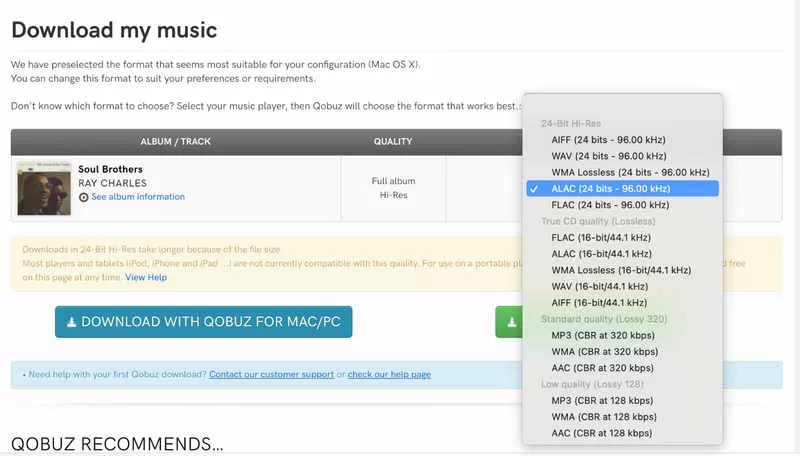
If you don’t want a subscription but still want to keep your music, Qobuz has a digital store. This is good for people who like to own their music instead of just streaming it. The store has millions of songs in high quality, and when you buy a song or album, you own it. You can download the files and save them on your computer without any limits. This option gives you real audio files, not app-locked downloads. However, it can get pricey if you want to download a lot of music.
Step 1: Go to the Qobuz Download Store and search for the track or album you want to buy.
Step 2: Open the album page, click “Buy the album,” and select your preferred audio quality to proceed to payment.

Step 3: After completing the payment, choose the output format you want, then click “Download with Qobuz for Mac/PC” to save the files to your computer.
- Official and legal downloads
- High-quality and Hi-Res audio available
- Real files you can keep permanently
- No subscription required
- Can be expensive for large collections
- Individual tracks and albums must be purchased
- No batch purchasing for entire libraries
Conclusion
In this article, we covered the main ways to download music from Qobuz, from using the official subscription downloads to purchasing tracks and albums directly from the Qobuz store. Each method has its place. Subscriptions are convenient for in-app listening, and buying music is great if you want to own a few albums in high quality. The downside is that both options come with limits, either app restrictions or higher costs over time. If you want unlimited access to your favorite songs, playlists, and albums in MP3 format, AudiConv Music Converter is the most flexible option. It lets you download music for true offline use, keep full control of your files, and build a library you can enjoy anytime, on any device.
